Arrays are used to store multiple values in a single variable.
Each value is called an element, and each element has a numeric position in the array, known as its index.
Arrays are zero-indexed, meaning the first element is at index 0, the second at index 1, and so on.
Arrays can contain any data type, including numbers, strings, and objects.
const arr1 = [2, 4, 6]; array
arr1[0]; element at index 0 → 2
arr1[1]; element at index 1 → 4
arr1[2]; element at index 2 → 6
arr1[3]; element at index 3 → undefined index not found
Objects are a data structure used to store related data collections.
It stores data as key/value pairs, where each key is a unique identifier for the associated value.
Each key must be a string and must be unique, each value can be any data type.
If you define an object with duplicate keys, the last one will overwrite any preceding ones.
Find the value for any given key in the object.
const obj1 = {"A": 4, "B": 5, "C": 6 };
obj1["A"]; key "A" → 4
obj1["B"]; key "B" → 5
obj1["C"]; key "C" → 6
obj1["D"]; key "D" → undefined key not found
Find the value for any given key in the object.
const obj2 = {"A": 4, "B": 5, "C": 6 }; object
const str = "ABC"; string
obj2[str[0]]; → 4
obj2[str[1]]; → 5
obj2[str[2]]; → 6
obj2[str[3]]; → undefined key not found
Object.keys() static method returns an array with the keys of an object.
const obj3 = { "A": 4, "B": 5, "C": 6 }; object
const obj3Key = Object.keys(obj3);
console.log(obj3Key); returns ↴
["A", "B", "C"] → array
obj3Key[0] → "A"
obj3Key[1] → "B"
obj3Key[2] → "C"
Object.values() returns an array with the proprty values of an object.
const obj4 = { "A": 4, "B": 5, "C": 6 }; object
const obj4Val = Object.values(obj4);
console.log(obj4Val); returns ↴
[4, 5, 6] → array
obj4Val[0] → 4
obj4Val[1] → 5
obj4Val[2] → 6
Object.entries() static method returns an array of the key/value pairs of an object.
const obj5 = { "A": 4, "B": 5, "C": 6 }; object
const obj5Ent = Object.entries(obj5);
console.log(obj5Ent); returns ↴
[ ["A", 4], ["B", 5], ["C", 6] ] → array of arrays
obj5Ent[0] → ["A", 4] → array
obj5Ent[1] → ["B", 5] → array
obj5Ent[2] → ["C", 6] → array
obj5Ent = [["A", 4], ["B", 5], ["C", 6]] → array of arrays
obj5Ent[0][0] → "A" access the first element of the first array
obj5Ent[0][1] → 4 access the second element of the first array
obj5Ent[1][0] → "B" access the first element of the second array
obj5Ent[1][1] → 5 access the second element of the second array
obj5Ent[2][0] → "C" access the first element of the third array
obj5Ent[2][1] → 6 access the second element of the third array
Connect to an API using ↴
RESTful API → API based on REST design principles that follow a set of rules and conventions for building and interacting with web services.
axios → HTTP client library that allows you to make HTTP requests to a given endpoint.
promise → an object representing the eventual completion or failure of an asynchronous operation.
async → declares an asynchronous function.
await → pauses the execution of the function until the Promise is resolved.
try...catch → statement for error handling.
JSON → lightweight, human-readable text format for data storage and transmission.
countries.dev API → provides information about countries including their name, capital, population, currencies, flags, languages, timezones, and more.
REST APIRepresentational State Transfer
A REST API is any API that adheres to the principles of Representational State Transfer (REST). It is a set of guidelines for creating web services that allow for interaction with resources over HTTP.
RESTful API
A RESTful API is governed by several key constraints that ensure its effectiveness and scalability. These constraints include ...
Statelessness → Each request from a client must contain all the information needed to process it. The server does not store any client context between requests, which simplifies server design and improves scalability.
Client-Server Architecture → The separation of client and server allows for independent evolution of both. The client handles the user interface, while the server manages data storage and processing.
Cacheability → Responses must define themselves as cacheable or non-cacheable, allowing clients to reuse responses for identical requests, thus improving performance.
Layered System → A RESTful API can be composed of multiple layers, with each layer having its own responsibilities. This promotes scalability and security by allowing intermediaries like proxies and gateways.
Uniform Interface → A consistent interface simplifies the architecture, allowing different clients to interact with the API in a standardized way. This includes using standard HTTP methods (GET, POST, PUT, DELETE) and resource representations (JSON, XML).
It allows different software applications to communicate over the internet using standard HTTP methods such as ...
GET → request data from a server
POST → send data to a server
PUT → update existing data on a server
DELETE → remove specified data from a server
While all RESTful APIs are REST APIs, not all REST APIs are necessarily RESTful. REST APIs have a higher level of adherence to REST principles.
Axios
Axios is an HTTP client library that allows you to make HTTP requests to a given endpoint. It is promise-based, which means that you can use async/await or promises to handle the results of any request.
It automatically transforms JSON data, unlike fetch which requires you to call .json() on the response.
On the server side, Axios uses Node.js native HTTP module, while on the browser, it uses XMLHttpRequest objects.
Advantages of using Axios.
Ease of use → supports all HTTP methods, including GET, POST, PUT, DELETE, and more.
To perform a GET request, you use the .get() method.
Axios automatically transforms JSON data, making it easier to work with APIs that return JSON responses.
Error Handling → throws 400 and 500 range errors for you, unlike the Fetch API, where you have to check the status code and throw the error yourself.
Cross-browser Compatibility → works seamlessly across different browsers, ensuring consistent behavior regardless of the user's environment.
Support for Older Browsers → unlike the Fetch API, which may not be supported in older browsers, Axios provides a reliable solution for legacy systems.
Install Axios
To use Axios, you need to install it first. There are several ways to install Axios, depending on your environment and preference.
If you are using npm (Node Package Manager) you can install it in the terminal with the following command ...
npm install axios
If you are using yarn you can install it in the terminal with the following command ...
yarn add axios
In your JavaScript file import axios using the require syntax.
const axios = require('axios');
Alternatively you can use a CDN.
Content Delivery Network CDN
A content delivery network is a geographically distributed group of servers that caches content close to end users. A CDN allows for the quick transfer of assets needed for loading Internet content, including HTML pages, JavaScript files, stylesheets, images, and videos.
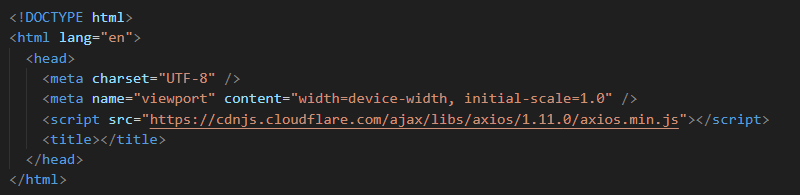
You can also include Axios directly in your HTML file using a CDN.
Install Axios via a CDN.
In the head section of your HTML code add the following script-src.
"https://cdnjs.cloudflare.com/ajax/libs/axios/1.11.0/axios.min.js"
async function
The primary purpose of an async function is to enable asynchronous programming in a more synchronous manner.
async
The async keyword is used to declare an asynchronous function.
Each time an async function is called, it returns a new Promise which will be resolved with the value returned by the async function, or rejected with an exception uncaught within the async function.
Async functions can contain zero or more await expressions.
await
The await keyword is used before the fetch call, which pauses the execution of the function until the Promise returned by fetch is resolved. This means that the code will wait for the network request to complete before proceeding to the next line.
If the function throws an error, it returns a rejected promise with the thrown error and is caught in the catch block.
The use of async and await allows for non-blocking code execution, making it easier to work with promises.
try...catch statement
The try statement checks whether a specific block of code contains an error or not.
The catch statement allows you to display the error if any are found in the try block.
try → code in the try block is executed first, and if it throws an exception, the code in the catch block will be executed.
catch → if an error occurs, the control jumps to the catch block, where it is handled, like logging to the console or showing a message to the user.
try {
// code that may cause an error
} catch (error) {
// code to handle the error
}
Promises
A promise is an object representing the eventual completion or failure of an asynchronous operation.
It allows you to handle asynchronous operations more easily by providing a cleaner syntax compared to callbacks.
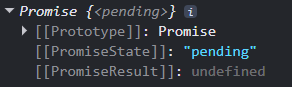
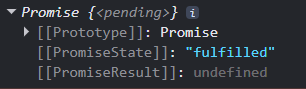
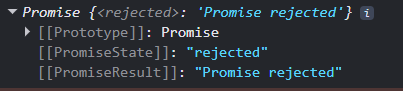
Promises have three states: pending, fulfilled, or rejected. When a promise is created, it is in a pending state.
It can then transition to either a fulfilled state if the operation is successful or a rejected state if it encounters an error.
Promises help in writing cleaner and more readable asynchronous code.
A Promise is in one of these states ...
pending → initial state, neither fulfilled nor rejected.
fulfilled → meaning that the operation was completed successfully.
rejected → meaning that the operation failed.
The eventual state of a pending promise can either be fulfilled with a value or rejected with a reason (error).
The code within the try block attempts to execute the fetch operation, and if it throws an exception, the code in the catch block will be executed.
Promise pending
Promise fulfilled
Promise rejected
JSONJavaScript Object Notation
JSON is a text-based data format following JavaScript object syntax. It represents structured data as a string, which is useful when you want to transmit data across a network.
Even though it closely resembles JavaScript object literal syntax, it can be used independently from JavaScript. Many programming environments feature the ability to read (parse) and generate JSON.
In JavaScript, the methods for parsing and generating JSON are provided by the JSON object.
JSON Parsing
The response from the server will be a JSON string, which we need to parse to convert it into a JavaScript object for further manipulation.
This can be accomplished using the JSON.parse() method.
const jsonStr = '{"name": "Spain", "capital": "Madrid"}'; → JSON string
console.log(jsonStr); returns ↴
{"name": "Spain", "capital": "Madrid"} → string
const obj6 = JSON.parse(jsonStr);
console.log(obj6); returns ↴
{name: "Spain", capital: "Madrid"} → JavaScript object
Response object
The response object returned by Axios contains the following information ...
config → The configuration object used for the request
data → The actual data returned from the API. In this case, it will be an array of user objects
headers → The headers sent back by the server, which may include metadata about the response
request → The request object that was sent to the server
status → The HTTP status code of the response (e.g., 200 for success)
statusText → The status message corresponding to the HTTP status code
https://jsonplaceholder.typicode.com/
jsonplaceholder is a simple fake REST API for testing and prototyping.
It has different endpoints that give us fake users, posts, todos, comments etc.
Connect to API and get response object
async function fetchData() {
try {
const response = await axios.get("https://jsonplaceholder.typicode.com/users");
console.log(response); → return response object
} catch (error) {
console.error("Error fetching data:", error.message);
}
};
fetchData(); returns ↴

The request was successful.
readyState → 4
status → 200
Error handling
axios has built-in support for error handling and provides more detailed error messages, while fetch only throws an error for network issues and does not provide specific error messages for various HTTP status codes.
When making requests, errors can occur due to network issues or invalid responses.
HTTP response status codes indicate whether a specific HTTP request has been successfully completed.
Responses are grouped in five classes ...
100-199 informational response → the request was received, continuing process
200-299 successful → the request was successfully received, understood, and accepted
300-399 redirection → further action needs to be taken in order to complete the request
400-499 client error → the request cannot be fulfilled due to an issue that the client might be able to control
500-599 server error → the server failed to fulfil an apparently valid request
Syntax to connect to API
async function fetchData() {
try {
const response = await axios.get(url);
// request is successful - return data from API
} catch (error) {
// error occurred - log any error mssages
}
};
Connect to API and return response data for users endpoint
async function fetchData2() {
try {
const response = await axios.get("https://jsonplaceholder.typicode.com/users");
console.log(response.data); → return data from API
} catch (error) {
console.error("Error fetching data:", error.message);
}
};
fetchData2(); returns ↴
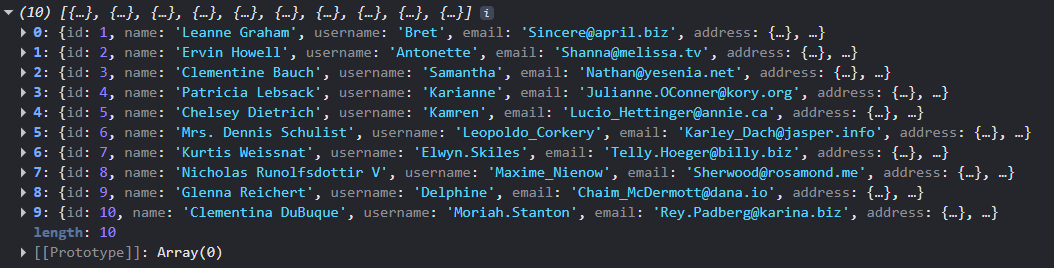
Axios throws 400 and 500 range errors for you, unlike the Fetch API, where you have to check the status code and throw the error yourself.
Error Examples ...
Console.error message - Error fetching data: Network Error

Console.error message - Error fetching data: Request failed

Console.error message - resource not found (typo: user → should be users)

Console.error message - (typo: comm → should be com)

API key
An API key is a unique code that identifies calls made to an API. It is used to authenticate and/or authorize API users and to track their usage.
const API_KEY = "your-api-key-here";
const url = `https://api.example.com/data?key=${API_KEY}`;
Find country data using an API
There are several APIs to find country data.
restcountries.com v3.1 is deprecated and v5 requires an API key, with a 500-request/month free tier.
countries.dev is a free, keyless alternative that returns the same country data. Every endpoint returns JSON over HTTPS with no API key, no signup and no rate-limit tiers.
We will use the countries.dev API.
Search by full name
The URL for this endpoint is ...
https://countries.dev/name/{name}
To search by country name we need to ensure that we provide the correct name, otherwise the API will return the first country whose name partially matches the query.
For example united states will return United States Minor Outlying Islands
If you are looking for United States of America you will need to enter the full name.
A URL is a reference or address used to access resources on the internet.
It specifies the location of a resource and the protocol used to retrieve it.
To search by country name - Spain
https://countries.dev/name/spain → URL
https → protocol
countries.dev → domain
/name/spain → path to the specific resource
https://countries.dev/name/spain returns ↴
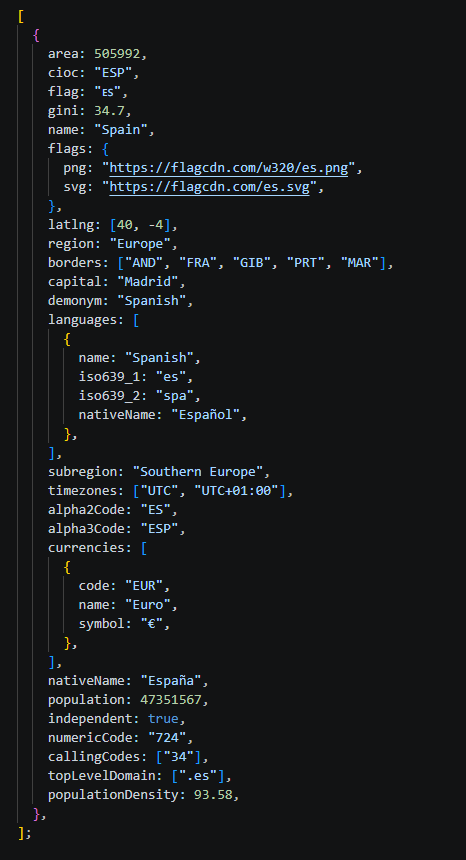
You can also list endpoints to accept query parameters.
For example, find the top three most populous countries sorted in descending order by population and include their name and region.
https://countries.dev/countries?sort=population&order=desc&limit=3&fields=name,population,region returns ↴
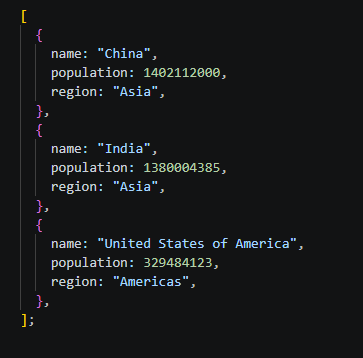
Define the country name for which we want to fetch data.
const countryName = "Spain"; → user input
Select the data we want to retreive.
capital of the country → user input
capital will be the endpoint
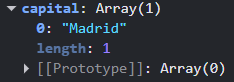
Define an asynchronous function getData to fetch data from an API.
function getData(countryName) {}
The function takes a string as input countryName and requests data from the countries API with that country name.
From the response, user selected data is retrieved.
If the requested endpoint is stored within an object, the specific data can to be accessed using ...
Object.values to return an array of the property values of the object.
Object.keys to return an array with the keys of the object.
Asynchronous function to fetch data about the specified country.
async function getData (country) {
try { Checks if code contains an error or not.
Template literals denote strings using backticks ``
This lets you embed variables and expressions within your strings.
Construct the URL for the REST Countries API using template literals.
const url = `https://countries.dev/name/${country}` url
Make a GET request to the API.
const response = await axios.get(url) response
Extract data from the response
const res = response.data[0].capital res
Log the data to the console.
console.log(res)
Log any errors that occur during the fetch.
catch (error)
console.error(`Error fetching ${countryName}:`, error.message)
}
Call the function with ↴
getData (countryName);
Connect to countries API and return the capital city of Spain.
const countryName = "Spain";
async function getData(country) {
try {
const url = `https://countries.dev/name/${country}`;
const response = await axios.get(url);
const res = response.data[0].capital;
console.log(res);
} catch (error) {
console.error(`Error fetching ${countryName}:`, error.message);
}
};
call function
getData(countryName); returns ↴
Madrid