Arrays are used to store multiple values in a single variable.
Each value is called an element, and each element has a numeric position in the array, known as its index.
Arrays are zero-indexed, meaning the first element is at index 0, the second at index 1, and so on.
Arrays can contain any data type, including numbers, strings, and objects.
const arr1 = [2, 4, 6]; array
arr1[0]; element at index 0 → 2
arr1[1]; element at index 1 → 4
arr1[2]; element at index 2 → 6
arr1[3]; element at index 3 → undefined index not found
Strings are a sequence of zero or more characters written inside quotes used to represent text.
Strings may consist of letters, numbers, symbols, words, or sentences.
Strings are immutable, they cannot be changed.
Each character in a string has an index.
The first character will be index 0 the second character will be index 1 and so on.
There are two ways to access an individual character in a string.
charAt() method
const str1 = "abc"; string
str1.charAt(0); character at index 0 → "a"
str1.charAt(1); character at index 1 → "b"
str1.charAt(2); character at index 2 → "c"
str1.charAt(3); character at index 3 → "" index not found
Alternatively use at() or slice() methods
bracket notation []
const str2 = "abc"; string
str2[0]; character at index 0 → "a"
str2[1]; character at index 1 → "b"
str2[2]; character at index 2 → "c"
str2[3]; character at index 3 → undefined index not found
Numbers are used to represent both integer and floating-point values.
Numbers are most commonly expressed in literal forms like 255 or 3.14159 ↴
let num1 = 5; → number
let num2 = 2.5; → number
let num3 = num1 + num2;
console.log(num3); returns ↴
7.5 → number
Find the difference between two arrays using ↴
for loop → iterates through each element in an array.
indexOf() method → returns the first index at which a given element can be found in an array.
push() method → adds specified elements to the end of an array and returns the new length of the array.
for loop repeatedly executes a block of code until a specified condition evaluates to false.
The loop runs a block of code a set number of times, defined by an initialization, a condition, and an increment.
const arr = []; → empty array
for (let x = 0; x < 4; x++) {
arr.push(x);
}
console.log(arr);
Initialize an empty array arr
Loop variable x is initialized to 1
Condition x < 4 is checked before each iteration.
The loop will continue to run as long as x is less than 4
The loop repeatedly executes a block of code 4 times, from 0 to 3
For each iteration of the loop, the current value of x is pushed to the end of the array.
After each iteration, x is incremented by 1 x++
When x reaches 4 the condition evaluates to false, terminating the loop.
[0, 1, 2, 3] → array returned
indexOf() method returns the first index at which a given element can be found in an array, or -1 if it is not present.
Find first index of element 6 in the array.
const arr2 = [2, 4, 6, 8, 6, 4];
arr2.indexOf(6); returns ↴
2 → index of first occurrence of element 6
Element is present.
Find first index of element 9 in the array.
const arr3 = [2, 4, 6, 8, 6, 4];
arr3.indexOf(9); returns ↴
-1 → element 9 NOT found in array.
Element NOT present.
array.indexOf(element) !== -1
If result is NOT -1 then the element is present in the array.
push() method adds new elements to the end of an array.
Add 4 to end of array.
const arr4 = [1, 2, 3];
arr4.push(4);
console.log(arr4); returns ↴
[1, 2, 3, 4] → 4 added to end of array
The push() method changes the length of the array.
arr4 is modified.
Using the spread operator creates a new array.
Add 4 to a new array.
const arr5 = [1, 2 , 3];
const arr6 = [...arr5, 4];
console.log(arr6); returns ↴
[1, 2, 3, 4] → 4 added to new array
console.log(arr5); returns ↴
[1, 2 ,3]
arr5 remains unchanged.
Initialize the two input arrays to find their difference.
Each input array should contain unique elements with no duplicates.
first array ↴
const array1 = [1, 2, 3, 4, 5]; → user input
second array ↴
const array2 = [4, 5, 6, 7, 8]; → user input
Define a function findDifference() to find the difference between two arrays.
function findDifference(arr1, arr2) {}
The function takes two arrays as input arr1, arr2 and returns a new array with their difference. The original arrays remain unchanged.
Each input array should contain unique elements with no duplicates.
Initialize an array to hold the difference.
let difference = [] difference array
for loop iterates through each element in the first array, arr1
for (let x = 0; x < arr1.length; x++) {}
indexOf() method returns the first index at which a given element can be found in the array.
arr2.indexOf(arr1[x]) === -1
If the result of indexOf() is -1 then the current element arr1[x] is NOT found in arr2, the element is unique to arr1
push() method adds the current element to the difference array if it is NOT found.
difference.push(arr1[x])
After the loop completes the difference array is returned.
return difference
The function returns a new array containing elements that are present in the first array but not in the second array.
If there is no difference between the two arrays then an empty array is returned.
Alternatively ↴
for loop iterates through each element in the second array, arr2, checking for elements that are NOT present in the first array, arr1
Initialize an empty array to hold the difference.
let difference = []
Find elements in the first array that are NOT in the second array
Iterate through the first array.
for (let x = 0; x < arr1.length; x++) {}
Check if the current element arr1[x] is NOT in the second array
if (arr2.indexOf(arr1[x]) === -1)
If NOT found, push it to the difference array.
difference.push>(arr1[x])
Alternatively ↴
Find elements in the second array that are NOT in the first array
Iterate through the second array.
for (let x = 0; x < arr2.length; x++) {}
Check if the current element arr2[x] is NOT in the first array
if (arr1.indexOf(arr2[x]) === -1)
If NOT found, push it to the difference array.
difference.push(arr2[x])
Return the array containg the difference between the two arrays.
return difference
Call the function with ↴
findDifference(array1, array2);
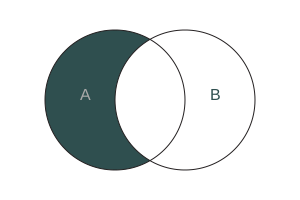
Find elements in first array that are NOT in the second array.
Find difference between two arrays
const array1 = [1, 2, 3, 4, 5];
const array2 = [4, 5, 6, 7, 8];
function findDifference(arr1, arr2) {
let difference = [];
for (let x = 0; x < arr1.length; x++) {
if (arr2.indexOf(arr1[x]) === -1) {
difference.push(arr1[x]);
}
}
return difference;
}
call function
findDifference(array1, array2); returns ↴
[1, 2, 3]
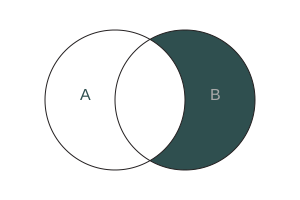
Find elements in second array that are NOT in the first array.
Find difference between two arrays
const array1 = [1, 2, 3, 4, 5];
const array2 = [4, 5, 6, 7, 8];
function findDifference(arr1, arr2) {
let difference = [];
for (let x = 0; x < arr1.length; x++) {
if (arr1.indexOf(arr2[x]) === -1) {
difference.push(arr2[x]);
}
}
return difference;
}
call function
findDifference(array1, array2); returns ↴
[6, 7, 8]
The input to the function should not contain any duplicate values.
Set Object is a collection of unique values where each value can only occur once, each value is unique.
Remove duplicates from array ↴
const myArr1 = [1, 2, 3, 4, 1, 2, 3, 4];
const setA = new Set(myArr1); set
const myArr2 = [...setA]; spread syntax
console.log(myArr2); returns ↴[1, 2, 3, 4] → array
same as ↴
const myArr3 = [1, 2, 3, 4, 1, 2, 3, 4];
[...new Set(myArr3)]; returns ↴
[1, 2, 3, 4] → array
Alternative ↴
Instead of indexOf() use includes() method
arr2.indexOf(arr1[x]) === -1 ↴
!arr2.includes(arr1[x])