Arrays are used to store multiple values in a single variable.
Each value is called an element, and each element has a numeric position in the array, known as its index.
Arrays are zero-indexed, meaning the first element is at index 0, the second at index 1, and so on.
Arrays can contain any data type, including numbers, strings, and objects.
const arr1 = [2, 4, 6]; array
arr1[0]; element at index 0 → 2
arr1[1]; element at index 1 → 4
arr1[2]; element at index 2 → 6
arr1[3]; element at index 3 → undefined index not found
Strings are a sequence of zero or more characters written inside quotes used to represent text.
Strings may consist of letters, numbers, symbols, words, or sentences.
Strings are immutable, they cannot be changed.
Each character in a string has an index.
The first character will be index 0 the second character will be index 1 and so on.
There are two ways to access an individual character in a string.
charAt() method
const str1 = "abc"; string
str1.charAt(0); character at index 0 → "a"
str1.charAt(1); character at index 1 → "b"
str1.charAt(2); character at index 2 → "c"
str1.charAt(3); character at index 3 → "" index not found
Alternatively use at() or slice() methods
bracket notation []
const str2 = "abc"; string
str2[0]; character at index 0 → "a"
str2[1]; character at index 1 → "b"
str2[2]; character at index 2 → "c"
str2[3]; character at index 3 → undefined index not found
Numbers are used to represent both integer and floating-point values.
Numbers are most commonly expressed in literal forms like 255 or 3.14159 ↴
let num1 = 5; → number
let num2 = 2.5; → number
let num3 = num1 + num2;
console.log(num3); returns ↴
7.5 → number
Find the difference between two arrays using ↴
Set Object → collection of unique values.
filter() method → creates a new array filled with elements that pass a test provided by a function.
has() method → returns true if a specified value exists in a Set, otherwise returns false.
Set Object is a collection of unique values.
Each value can only occur once, each value is unique.
const mySet = new Set();
console.log(mySet); returns ↴
Set(0) {size: 0} → empty Set
To add values to the Set we can use the add() method.
mySet.add("a");
mySet.add("b");
mySet.add("c");
console.log(mySet); returns ↴
Set(3) {"a", "b", "c"} → values added
Try to add a duplicate value.
mySet.add("c"); character "c" is already in mySet
console.log(mySet); returns ↴
Set(3) {"a", "b", "c"} → no change
To determine if mySet has an element present we can use the has() method.
mySet.has("a"); → true
mySet.has("d"); → false
filter() method iterates over each element of an array.
It creates and returns a new array containing only the elements that pass a test provided by a function.
Return a new array with values greater than 4
const arr2 = [1, 2, 3, 4, 5, 6, 7, 8, 9];
arr2.filter((num) => num > 4); returns ↴
[5, 6, 7, 8, 9] → numbers greater than 4
Initialize the two input arrays to find their difference.
first array ↴
const array1 = [1, 2, 3, 4, 5]; → user input
second array ↴
const array2 = [4, 5, 6, 7, 8]; → user input
Define a function findDifference() to find the difference between two arrays.
function findDifference(arr1, arr2) {}
The function takes two arrays as input arr1, arr2 and returns a new array with their difference. The original arrays remain unchanged.
Each input array may contain duplicates. Duplicates will be removed inside the function.
Set constructor is used to create two new Sets from the input arrays arr1, arr2
setA = new Set(arr1) setA
setB = new Set(arr2) setB
setA is converted back to an array to utilize the filter() method.
[...setA] converts the set back into an array (with any duplicates removed).
filter() method iterates over each element of the array
Initialize a variable to hold the difference.
const difference = [...setA].filter(callbackFn) difference
The method iterates over each unique element of the first array, arr1
It creates a new array filtered with elements that pass a test provided by a callback function.
callback function ↴
(element) => !setB.has(element)
has() method checks whether the current element is among the entries of setB
If the current element is NOT found, it is included in the difference array.
The difference array is returned.
return difference
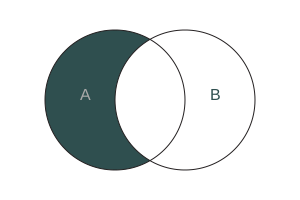
The function returns a new array containing elements that are present in the first array but not in the second array.
If there is no difference between the two arrays then an empty array [] is returned.
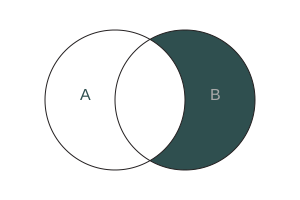
Alternatively, the function identifies elements in arr2 that are NOT present in setA
Find elements in first array that are NOT in the second array.
Create a Set from arr1 to store unique values.
const setA = new Set(arr1); setA
Create a Set from arr2 to store unique values.
const setB = new Set(arr2); setB
Convert setA back into an array to use the array filter() method.
[...setA] Converts a Set to an Array
Filter elements in setB that are not present in setA.
const difference = [...setA].filter((element) => !setB.has(element)); difference
Return the array containing the difference of the two arrays.
return difference;
Alternatively ↴
Find elements in second array that are NOT in the first array.
const difference = [...setB].filter((element) => !setA.has(element));
Call the function with ↴
findDifference(array1, array2);
Find elements in first array that are NOT in the second array.
Find difference between two arrays.
const array1 = [1, 2, 3, 4, 5];
const array2 = [4, 5, 6, 7, 8];
function findDifference(arr1, arr2) {
const setA = new Set(arr1);
const setB = new Set(arr2);
const difference = [...setA].filter((element) => !setB.has(element));
return difference;
}
call function
findDifference(array1, array2); returns ↴
[1, 2, 3]
Find elements in second array that are NOT in the first array.
Find difference between two arrays.
const array1 = [1, 2, 3, 4, 5];
const array2 = [4, 5, 6, 7, 8];
function findDifference(arr1, arr2) {
const setA = new Set(arr1);
const setB = new Set(arr2);
const difference = [...setB].filter((element) => !setA.has(element));
return difference;
}
call function
findDifference(array1, array2); returns ↴
[6, 7, 8]
Alternative - return directly without using a variable ↴
const difference = [...setA].filter((element) => !setB.has(element));
return difference; ↴
return [...setA].filter((element) => !setB.has(element));