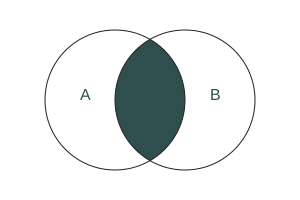
Arrays are used to store multiple values in a single variable.
Each value is called an element, and each element has a numeric position in the array, known as its index.
Arrays are zero-indexed, meaning the first element is at index 0, the second at index 1, and so on.
Arrays can contain any data type, including numbers, strings, and objects.
const arr1 = [2, 4, 6]; array
arr1[0]; element at index 0 → 2
arr1[1]; element at index 1 → 4
arr1[2]; element at index 2 → 6
arr1[3]; element at index 3 → undefined index not found
Strings are a sequence of zero or more characters written inside quotes used to represent text.
Strings may consist of letters, numbers, symbols, words, or sentences.
Strings are immutable, they cannot be changed.
Each character in a string has an index.
The first character will be index 0 the second character will be index 1 and so on.
There are two ways to access an individual character in a string.
charAt() method
const str1 = "abc"; string
str1.charAt(0); character at index 0 → "a"
str1.charAt(1); character at index 1 → "b"
str1.charAt(2); character at index 2 → "c"
str1.charAt(3); character at index 3 → "" index not found
Alternatively use at() or slice() methods
bracket notation []
const str2 = "abc"; string
str2[0]; character at index 0 → "a"
str2[1]; character at index 1 → "b"
str2[2]; character at index 2 → "c"
str2[3]; character at index 3 → undefined index not found
Numbers are used to represent both integer and floating-point values.
Numbers are most commonly expressed in literal forms like 255 or 3.14159 ↴
let num1 = 5; → number
let num2 = 2.5; → number
let num3 = num1 + num2;
console.log(num3); returns ↴
7.5 → number
Find the intersection of two arrays using ↴
reduce() method → executes a reducer function, resulting in a single output value.
includes() method → returns true if an array contains a specified value, otherwise returns false.
push() method → adds specified elements to the end of an array and returns the new length of the array.
reduce() method iterates over each element in an array, and each iteration returns a single value, which is the accumulator.
When the iteration is finished, the accumulator value will be returned from the method.
It takes two parameters: a callback function and an optional initial value ↴
callback function first parameter.
initialValue second parameter. The accumulator is initialized to the first element of the array if no initial value is provided.
The callback function takes four parameters ↴
accumulator The value resulting from the previous call to callback function - required.
currentValue The value of the current element - required.
currentIndex Index position of currentValue in the array - optional.
Array The array reduce() was called upon - optional.
syntax
array.reduce(callback, initialValue); ↴
array.reduce((accumulator, currentValue, currentIndex, Array), initialValue)
Example 1 | Find the sum of the array ↴
const arr2 = [1, 2, 3, 4, 5, 6];
arr2.reduce((acc, cur) => acc + cur, 0); Initial value → 0
returns ↴
21
During each iteration, the current value cur will be added to the accumulator acc ↴
acc + cur
Iteration ↴
0 acc Initial value → 0
1 acc 0 → 0 + 1 = 1 → 1
2 acc 1 → 1 + 2 = 3 → 3
3 acc 3 → 3 + 3 = 6 → 6
4 acc 6 → 6 + 4 = 10 → 10
5 acc 10 → 10 + 5 = 15 → 15
6 acc 15 → 15 + 6 = 21 → 21
The return value becomes the value of the accumulator parameter acc on the next invocation of the callback function.
For the last invocation, the return value becomes the return value of reduce()
When the iteration is finished, the accumulator value will be returned ↴
21 → sum of the array
Example 2 | Find even numbers ↴
const arr3 = [11, 12, 13, 14, 15, 16, 17];
const evenNumbers = arr3.reduce((acc, cur) => {
return cur % 2 === 0 ? [...acc, cur] : acc;
}, []); Initial value → []
console.log(evenNumbers); returns ↴
[12, 14, 16]
During each iteration, the ternary operator evaluates the condition cur % 2 === 0
If current element cur is divisible by 2, it will be added to the accumulator array, acc
[...acc, cur] ↴
cur % 2 === 0 ? [...acc, cur] : acc
If current element cur not divisible by 2, the accumulator acc will be returned as is.
Iteration ↴
0 acc 11 → [] Initial value is an empty array
1 acc 11 → []
2 acc 12 → [12] 12 added to acc array
3 acc 13 → [12]
4 acc 14 → [12, 14] 14 added to acc array
5 acc 15 → [12, 14]
6 acc 16 → [12, 14, 16] 16 added to acc array
7 acc 17 → [12, 14, 16]
The return value becomes the value of the accumulator parameter acc on the next invocation of the callback function.
For the last invocation, the return value becomes the return value of reduce()
When the iteration is finished, the accumulator value will be returned ↴
[12, 14, 16] → even numbers
includes() method determines whether an array includes a certain value among its entries, returning true or false
const arr4 = [1, 2, 3, 4, 5, 6];
arr4.includes(4); returns boolean ↴
true → 4 found in array
const arr5 = [1, 2, 3, 4, 5, 6];
arr5.includes(7); returns boolean ↴
false → 7 NOT found in array
logical NOT ! syntax converts a true value to a false and vice-versa.
!arr5.includes(7); returns boolean ↴
true → 7 NOT found in array
push() method adds new elements to the end of an array.
Add 4 to end of array.
const arr6 = [1, 2, 3];
arr6.push(4);
console.log(arr6); returns ↴
[1, 2, 3, 4] → 4 added to end of array
The push() method changes the length of the array.
arr6 is modified.
Using the spread operator creates a new array.
Add 4 to a new array.
const arr7 = [1, 2 , 3];
const arr8 = [...arr7, 4];
console.log(arr8); returns ↴
[1, 2, 3, 4] → 4 added to new array
console.log(arr7); returns ↴
[1, 2 ,3]
arr7 remains unchanged.
Initialize the two input arrays to find their intersection.
first array ↴
const array1 = [1, 2, 3, 4, 5]; → user input
second array ↴
const array2 = [4, 5, 6, 7, 8]; → user input
Define a function findIntersection() to find the intersection of two arrays.
function findIntersection(arr1, arr2) {}
The function takes two arrays as input arr1, arr2 and returns a new array with their intersection. The original arrays remain unchanged.
Each input array may contain duplicates. Duplicates will be removed inside the function.
Use the reduce() method to iterate over the first array arr1 and build the intersection array.
arr1.reduce()
reduce() method iterates over the first array and returns a single array with the elements that appear in both arrays.
reduce(callbackFn, initialValue) ↴
reduce((intersection, element) => (), [])
intersection is the accumulator (initialized as an empty array)
element is the current element
[] initialValue is an empty array
callback function ↴
(intersection, element) => {
if (arr2.includes(element) && !intersection.includes(element)) {
intersection.push(element)
}
return intersection
}
The reduce method executes a reducer function, resulting in a single output value, the intersection array.
callback function has 2 conditions.
arr2.includes(element) &&
!intersection.includes(element)
First condition ↴
arr2.includes(element)
includes() method checks whether the current element is among the entries of the second array, arr2
If it is found, the element will be included in the intersection array if the next condition is also true.
Second condition ↴
!intersection.includes(element)
includes() method checks whether the intersection array does NOT already include the current element.
This eliminates any duplicates.
If BOTH condtions are true, the element is added to the intersection array.
intersection.push(element)
initial value ↴
[] empty array
The return value becomes the value of the accumulator parameter intersection on the next invocation of the callback function.
return intersection
For the last invocation, the return value becomes the return value of reduce()
The function returns a new array containing only the unique elements that are common in both arrays.
If there is no intersection present then an empty array [] is returned.
Use reduce to iterate over array arr1 and build the intersection array.
return arr1.reduce((intersection, element) => {
Check if the current element is in arr2 and is NOT already in the intersection array.
if (arr2.includes(element) && !intersection.includes(element)) {
If both conditions are met, add the element to the intersection array.
intersection.push(element)
Return the accumulated intersection array.
return intersection
Initialize the intersection array as an empty array.
}, [])
Call the function with ↴
findIntersection(array1, array2);
Find the intersection of two arrays, array1 and array2.
const array1 = [1, 2, 3, 4];
const array2 = [3, 4, 5, 6];
function findIntersection(arr1, arr2) {
return arr1.reduce((intersection, element) => {
if (arr2.includes(element) && !intersection.includes(element)) {
intersection.push(element);
}
return intersection;
}, []);
}
call function
findIntersection(array1, array2); returns ↴
[3, 4]
Alternative to add an element to end of array ↴
const arr7 = [1, 2 ,3];
arr7.push(4);
console.log(arr7); returns ↴
[1, 2, 3, 4] → 4 added to end of array
same as using the spread operator ↴
const arr8 = [1, 2 ,3];
[...arr8, 4]; returns ↴
[1, 2, 3, 4] → 4 added to end of array
Alternative ↴
Instead of includes() use indexOf() method.
if (arr2.includes(element) && !intersection.includes(element)) {} ↴
if (arr2.indexOf(element) !== -1 && !intersection.includes(element)) {}
Alternative ↴
Condition not required if the input has no duplicates.
&& !intersection.includes(element)