Numbers are used to represent both integer and floating-point values.
Numbers are most commonly expressed in literal forms like 255 or 3.14159 ↴
let num1 = 5; → number
let num2 = 2.5; → number
let num3 = num1 + num2;
console.log(num3); returns ↴
7.5 → number
Generate a countdown using ↴
Promise → an object representing the eventual completion or failure of an asynchronous operation.
async → declares an asynchronous function.
await → pauses the execution of the function until the Promise is resolved.
resolve() → method returns a Promise object resolved with a value.
setInterval() → method repeatedly calls a function or executes a code snippet, with a fixed time delay between each call.
clearInterval() → method cancels a timed, repeating action which was previously established by a call to setInterval().
Promises
A promise is an object representing the eventual completion or failure of an asynchronous operation.
It allows you to handle asynchronous operations more easily by providing a cleaner syntax compared to callbacks.
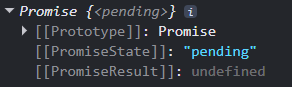
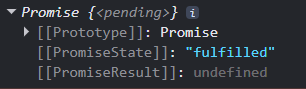
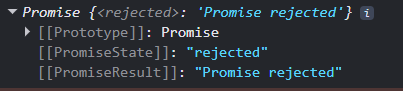
Promises have three states: pending, fulfilled, or rejected. When a promise is created, it is in a pending state.
It can then transition to either a fulfilled state if the operation is successful or a rejected state if it encounters an error.
Promises help in writing cleaner and more readable asynchronous code.
A Promise is in one of these states ...
pending → initial state, neither fulfilled nor rejected.
fulfilled → meaning that the operation was completed successfully.
rejected → meaning that the operation failed.
The eventual state of a pending promise can either be fulfilled with a value or rejected with a reason (error).
Promise pending
Promise fulfilled
Promise rejected
async function
The primary purpose of an async function is to enable asynchronous programming in a more synchronous manner.
async
The async keyword is used to declare an asynchronous function.
Each time an async function is called, it returns a new Promise which will be resolved with the value returned by the async function, or rejected with an exception uncaught within the async function.
Async functions can contain zero or more await expressions.
await
The await keyword is used before the fetch call, which pauses the execution of the function until the Promise returned by fetch is resolved. This means that the code will wait for the network request to complete before proceeding to the next line.
If the function throws an error, it returns a rejected promise with the thrown error and is caught in the catch block.
The use of async and await allows for non-blocking code execution, making it easier to work with promises.
resolve() method is called when the asynchronous operation completes successfully.
It transitions the Promise from a pending state to a fulfilled state.
reject() method is called when the asynchronous operation fails.
It transitions the Promise from a pending state to a rejected state.
Example ...
function myPromiseAsync() {
return new Promise((resolve, reject) => {
const success = true; simulate success condition
if (success) {
resolve("Promise resolved successfully!");
} else {
reject("Promise rejected.");
}
});
}
async function myPromise() {
try {
const res = await myPromiseAsync();
console.log(res);
} catch (error) {
console.error(error);
}
}
call function
myPromise();
returns ↴
Promise resolved successfully!
setInterval() method repeatedly calls a function or executes a code snippet, with a fixed time delay between each call. It continues to run at the specified intervals until it is explicitly stopped.
syntax
setInterval(function, delay);
function → function containing a block of code
delay → time interval between the execution of the function
Print to console the countdown from 3.
let count = 3; → count
const interval = setInterval(() => {
console.log(count); → print to console
count--; → decrement count by 1
}, 1000); → delay in milliseconds
returns ↴
3 → printed to console after 1000 ms
4 → printed to console after 1000 ms
1 → printed to console after 1000 ms
0 → printed to console after 1000 ms
-1 → printed to console after 1000 ms
-2 → printed to console after 1000 ms
... continues to run until it is explicitly stopped.
The return value of the function is an intervalID which can be used later to clear the interval if needed.
clearInterval() method cancels a timed, repeating action which was previously established by a call to setInterval()
If the parameter provided does not identify a previously established action, this method does nothing.
syntax
clearInterval(intervalID);
intervalID → identifier of the repeated action you want to cancel. This ID was returned by the corresponding call to setInterval()
Print to console the countdown from 3 to 0 and print the message "Go".
function countdown() {
let count = 3; → start countdown from 3
const interval = setInterval(() => {
console.log(count);
count--;
if (count < 0) { → end countdown at 0
clearInterval(interval);
console.log("Go"); → message
}
}, 1000); → delay in milliseconds
}
call function
countdown(); returns ↴
3 → printed to console after 1000 ms
2 → printed to console after 1000 ms
1 → printed to console after 1000 ms
0 → printed to console after 1000 ms
Go → printed to console
Initialize a variable to hold the number to start countdown from.
const countFrom = 5; → user input
Initialize a variable to hold the delay interval.
const delay = 500; → user input
Initialize a variable to hold the message to display.
const message = "BLAST OFF"; → user input
Define a function countdown to countdown to zero from a given number, at a given interval duration and a message to display.
function countdown() {}
The function takes no input, but has user defined variables.
Starting count for the countdown.
const countFrom = 5 countFrom
Interval duration in milliseconds.
const delay = 500 delay
Message to display after countdown.
const message = "BLAST OFF" message
Function to perform the countdown asynchronously.
function countdownAsync() {
Return a new Promise.
return new Promise((resolve) => {
Initialize count with the starting number.
let count = countFrom count
Set up an interval to execute the countdown.
const interval = setInterval(() => { interval intervalID
Log the current count to the console.
console.log(count)
Decrement the count by 1
count--
Check if the count has reached below 0
if (count < 0) {
Clear the interval to stop the countdown.
clearInterval(interval)
Resolve the Promise with the final message.
resolve(message)
Execute every 500 milliseconds
}, delay)
Async function to handle the countdown and log the final message.
async function countdown() {
Wait for the countdown to complete.
const msg = await countdownAsync()
Log the final message to the console.
console.log(msg)
Call the function with ↴
countdown();
Generate a countdown.
const countFrom = 5;
const delay = 500;
const message = "BLAST OFF";
function countdownAsync() {
return new Promise((resolve) => {
let count = countFrom;
const interval = setInterval(() => {
console.log(count);
count--;
if (count < 0) {
clearInterval(interval);
resolve(message);
}
}, delay);
});
}
async function countdown() {
const msg = await countdownAsync();
console.log(msg);
}
call function
countdown(); returns ↴
5 → printed to console after 500 ms
4 → printed to console after 500 ms
3 → printed to console after 500 ms
2 → printed to console after 500 ms
1 → printed to console after 500 ms
0 → printed to console after 500 ms
BLAST OFF → printed to console